Overview
ANCHOR - Stability Engine
We strongly recommend testing the demo version in your environment to ensure compatibility before purchasing.
※ Account login or free registration is required to download the demo version.
🔑 Log in / Create Account to Get Free DemoANCHOR is an audio plugin that analyzes the "stable components" and "transient components" of a sound, shaping its character across frequency bands. Rather than working like a traditional EQ or compressor, ANCHOR takes an analysis-first approach — it reads the unique "stability profile" of the source material and applies custom processing tailored specifically to that signal, band by band.
Product Description:
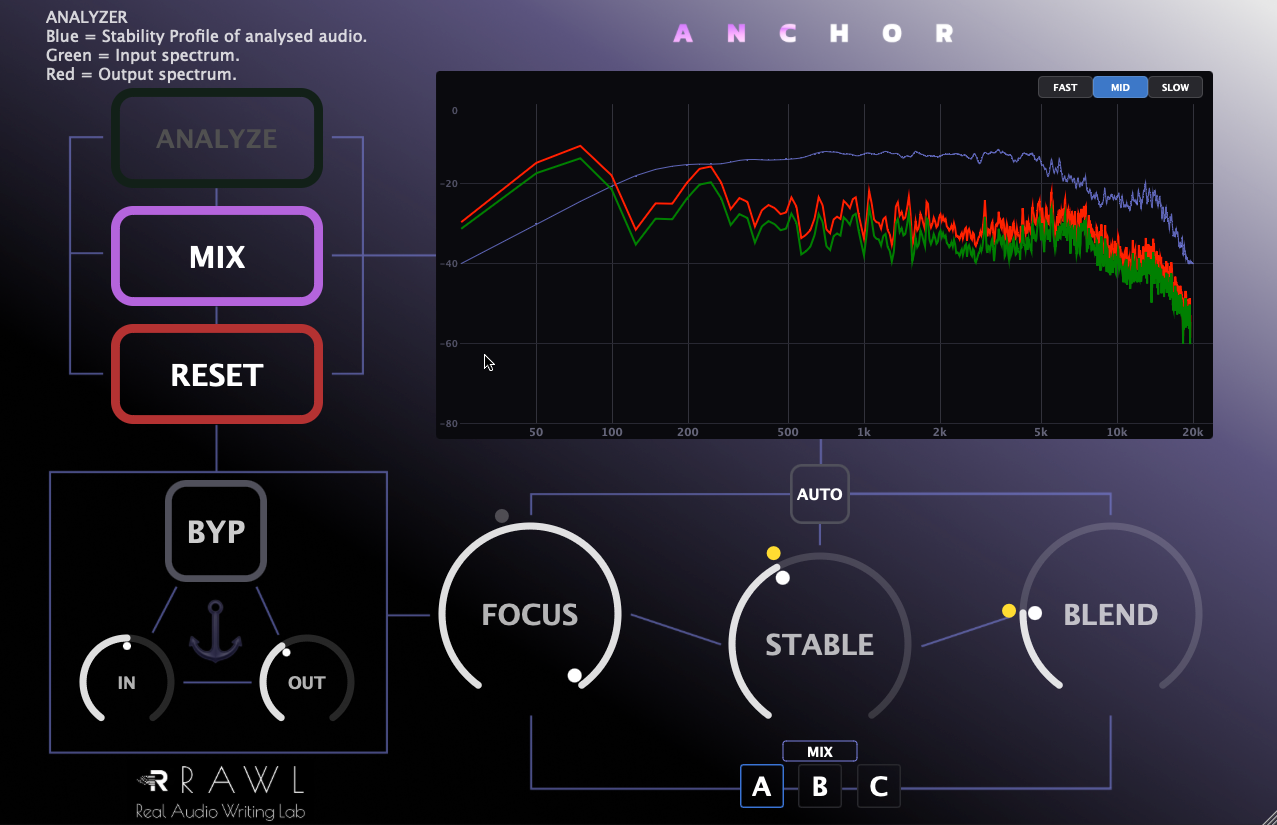
A stability shaper that analyzes the audio source to bring out stable components while taming unwanted attack components. It visualizes the ratio between the sound's "bite" (attack) and "body" (sustain) and optimizes it band by band. It features two modes: SOLO mode for single tracks and MIX mode for 2-mix/bus groups. It also includes an AUTO button for automatic configuration and an A/B comparison feature for intuitive sound matching.
【Key Features】
- ■ FOCUS: Selects the processing band from 10 steps (Sub to ALL).
- ■ STABLE: Enhances stable components (adding core, presence, and body).
- ■ BLEND: Suppresses transient components (taming the attack).
- ■ SOLO / MIX: Toggles between analysis modes tailored for single sources or mix buses.
- ■ A/B Bank Comparison: Effortlessly compare and match settings.
- ■ File Drag-and-Drop: Supports WAV, AIF, AIFF, MP3, M4A, AAC, FLAC, OGG for seamless analysis.
- ■ Demo Mode Included: Test all features directly in your DAW.
【Installation & Bypassing Security Warnings】
As an independently developed tool, you may see a "developer cannot be verified" warning. This program contains no malicious code or malware. Please follow these steps to install:
■ macOS:
1. Right-click the installer and select “Open”.
2. In the confirmation dialog, click “Open” again.
On macOS Sequoia, Apple has changed the Gatekeeper behavior for unnotarized software. Please try the following:
- Go to System Settings → Privacy & Security.
- Scroll down to the Security section near the bottom.
- If you see a message saying that “(PluginName) Installer.pkg” was blocked, click “Open Anyway”.
- Enter your administrator password or use Touch ID if prompted, then try opening the installer again.
■ Windows:
1. On the blue warning screen, click “More info”.
2. Click the “Run anyway” button in the bottom-right corner.
💻 TESTED ENVIRONMENTS
| [macOS] |
OS: macOS 13 (Ventura) or later recommended Format: VST3 / AU Tested DAWs: Logic Pro 11, Studio One 6 Verified Hardware: Apple Silicon (M1) / 16GB RAM |
| [Windows] |
OS: Windows 10 (64-bit) Format: VST3 (64-bit) Tested DAW: REAPER Verified Hardware: Intel Core i5 (4th Gen) / 8GB RAM |
【Important Notice】
- ■ Please ensure you test the demo mode thoroughly in your system before purchasing.
- ■ Due to the nature of software, we cannot offer cancellations or refunds.
- ■ Note: After activating your license, please reload the plugin or restart your DAW to reflect the changes.
- ■ The author shall not be liable for any damages arising from the use of this software.
Reviews
★★★★☆ 4.0 out of 5 (1 reviews)
Log in to write a review.
I don’t know anything out there that does what one does!
Found an inappropriate review? Contact support.