Overview
Orochi — 8-Threshold Block Compressor
We strongly recommend testing the demo version in your environment to ensure compatibility before purchasing.
※ Account login or free registration is required to download the demo version.
🔑 Log in / Create Account to Get Free Demo🎧 OVERVIEW
Natural Peak Shaving Through Multi-Stage Compression
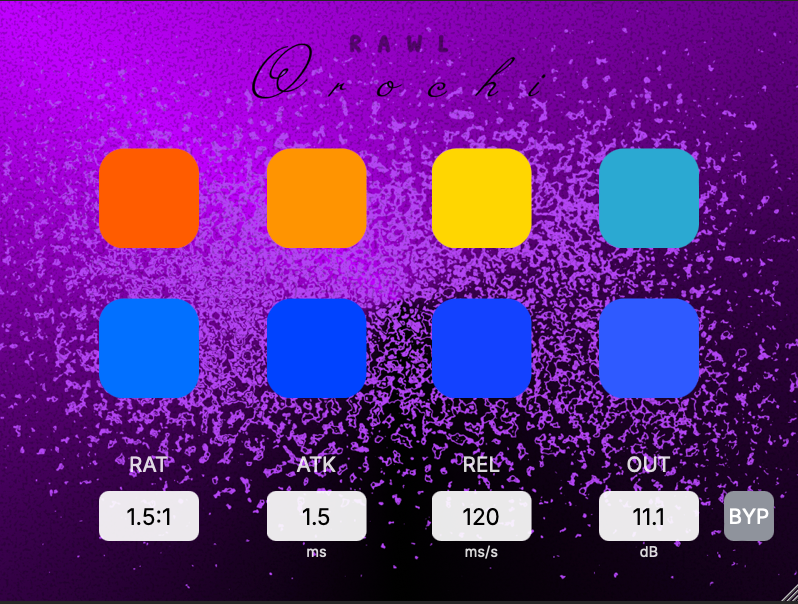
Orochi is a serial compressor equipped with 8 staggered threshold blocks. Instead of heavily crushing transients in a single pass, Orochi gradually applies gentle compression across 8 sequential stages, transparently taming peaky dynamics while preserving the natural punch and clarity of your source material.
✨ KEY FEATURES
8-Stage Staggered Threshold Architecture
Default thresholds start at -6 dB on Block 1 and step down by 0.5 dB per block. Each block's threshold can be set anywhere from 0 dB down to its own limit, and that limit gets 3 dB deeper with every block:
| Block 1 | -30 dB |
| Block 2 | -33 dB |
| Block 3 | -36 dB |
| Block 4 | -39 dB |
| Block 5 | -42 dB |
| Block 6 | -45 dB |
| Block 7 | -48 dB |
| Block 8 | -51 dB |
Capped Gain Reduction per Block
Each threshold block is capped at a maximum of -3 dB gain reduction to prevent over-compression and unnatural pumping.
Color-Coded Gain Reduction Metering
Visual feedback reflects the amount of gain reduction in each block (approximate guide):
- White: 0 dB (No reduction)
- Blue: -1 dB
- Yellow: -2 dB
- Red: -3 dB (Max reduction)
🎛️ PARAMETERS & CONTROLS
| Ratio | 1.0:1 – 8.0:1 |
| Attack | 0.1 ms – 300 ms |
| Release | 10 ms – 5.00 s |
| Output | -24 dB – +24 dB |
| Bypass | Toggle plugin processing On/Off |
🖱️ WORKFLOW & UI DETAILS
- Multi-Block Selection: Click and drag across threshold blocks to select multiple blocks simultaneously for quick editing. Selected blocks are highlighted with a distinct black outline (click outside any block to deselect).
- Quick Value Reset: Option + Click (macOS) / Alt + Click (Windows) on any parameter to instantly reset it to its default value.
🛡️ INSTALLATION & SECURITY
As an independently developed tool, your operating system may show a "developer cannot be verified" warning. This is standard for independent software and contains no malware.
macOS: Right-click installer → Select "Open" → Click "Open" again.
(macOS Sequoia: System Settings → Privacy & Security → Open Anyway)
Windows: On blue SmartScreen → Click "More info" → Click "Run anyway".
💻 TESTED ENVIRONMENTS
| [macOS] |
Format: VST3 / AU / AAX Tested on: macOS 14 (Sonoma) Apple M1 / 16GB DAWs: Logic Pro 11, Studio One 6, Pro Tools Ultimate 2025.12.0 |
| [Windows] |
Format: VST3 / AAX (64-bit) Tested on: Windows 11 Intel Core i5 (9th Gen) / 16GB DAWs: REAPER v7.61, Nuendo 15.0.30, Pro Tools Ultimate 2026.4.1 |
📌 IMPORTANT NOTICE
- DAW Plugin List: The plugin will appear in your DAW list as "Orochi".
- Demo Testing: Please ensure you test this demo version thoroughly in your system before purchasing.
- Refund Policy: Due to the digital nature of software, cancellations and refunds are not available.
- License Activation: After activating your license, please reload the plugin or restart your DAW to apply the changes. On initial activation, UI indicator updates may occasionally lag slightly depending on your environment, but this does not affect functionality.
- Disclaimer: The author shall not be liable for any damages arising from the use of this software.
Motto: "Developing the tools that should exist, but don't."