Overview
RVA - RAWL Vertical Analyzer
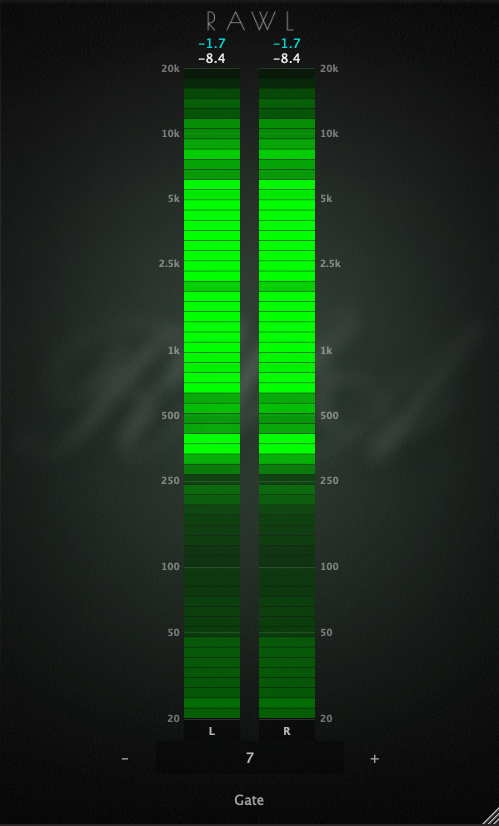
A space-saving, vertical 64-band spectrum analyzer designed to fit perfectly into your desktop workflow.
- Precise Level Management: Digital readouts at the top display both [Real-Time Values] and [Maximum Peak Values]. This allows for highly accurate level management alongside visual balance monitoring.
- Ultimate Visibility Customization: Features built-in "Brightness" and "Gate" controls, letting you optimize visibility to perfectly match your studio’s lighting and your personal preference.
- Stress-Free Workflow: The window size remembers your last resized setting and automatically applies it the next time you insert the plugin. No need to resize it every single time.
With its simple vertical layout and reliable analysis, RVA keeps your workspace clean while delivering the precision your mix needs.
【Installation & Bypassing Security Warnings】
As an independently developed tool, you may see a "developer cannot be verified" warning. This program contains no malicious code or malware. Please follow these steps to install:
■ macOS:
Right-click the installer and select “Open”.
In the confirmation dialog, click “Open” again.
On macOS Sequoia, Apple has changed the Gatekeeper behavior for unnotarized software. Please try the following:
- Go to System Settings → Privacy & Security.
- Scroll down to the Security section near the bottom.
- If you see a message saying that “(PluginName) Installer.pkg” was blocked, click “Open Anyway”.
- Enter your administrator password or use Touch ID if prompted, then try opening the installer again.
■ Windows:
On the blue warning screen, click “More info”.
Click the “Run anyway” button in the bottom-right corner.
💻 TESTED ENVIRONMENTS
| [macOS] |
OS: macOS 13 (Ventura) or later recommended Format: VST3 / AU Tested DAWs: Logic Pro 11, Studio One 6 |
| [Windows] |
OS: Windows 10 (64-bit) Format: VST3 (64-bit) Tested DAW: REAPER |
| [General] | Verified on: Intel Core i5 (4th Gen) / 8GB RAM |
【Important Notice】
- ■ Note: The plugin will appear in your DAW list as "RVA" (not "RVA - RAWL Vertical Analyzer").
- ■ Note (Windows only): When adjusting the Gate slider, a minor UI flicker may occur in part of the interface. This does not affect audio processing or plugin functionality.
- ■ Due to the nature of software, we cannot offer cancellations or refunds.
- ■ The author shall not be liable for any damages arising from the use of this software.